







🚀 All-in-one SSL certificate lifecycle management solution | Supports Let's Encrypt, ZeroSSL, Google, SSL.COM, BuyPass and more | Multi-platform deployment | Automated operations

- ✅ Fully automated certificate application / renewal
- 🌐 Multi-platform deployment (CDN / WAF / control panels / cloud storage)
- 🔔 Certificate expiration monitoring
- 🛡️ Secure entry protection
- 📊 Visual certificate management
We are actively improving the following features. Feel free to suggest via GitHub Issues!

- Linux
- macOS / Windows (script installation not yet supported; see manual steps below)
- Docker
curl -sSO http://allinssl.bt.cn/install_allinssl.sh && bash install_allinssl.sh allinsslcurl -sSO http://download.allinssl.com/install_allinssl.sh && bash install_allinssl.sh allinssldocker run -itd \
--name allinssl \
-p 8888:8888 \
-v /www/allinssl/data:/www/allinssl/data \
-e ALLINSSL_USER=allinssl \
-e ALLINSSL_PWD=allinssldocker \
-e ALLINSSL_URL=allinssl \
-e TZ=Asia/Shanghai \
allinssl/allinssl:latest- Open the releases page
- Download the latest binary for your platform
- Extract the archive and navigate to the directory in your terminal / CMD
- Retrieve the login URL, username, and password:
- URL & username:
- Linux:
./allinssl 15 - Windows:
.\allinssl 15
- Linux:
- Password:
- Linux:
./allinssl 6 - Windows:
.\allinssl 6
- Linux:
- URL & username:
- Start the service (keep the terminal open, or configure a process daemon):
- Linux:
./allinssl start - Windows:
.\allinssl start
- Linux:
- Visit
http://your-server-ip:port/<secure-entry>and log in - See Command Line Operations for more commands
Requires Go 1.23+:
git clone https://github.com/allinssl/allinssl.git
cd allinssl
go mod tidy
go build -o allinssl cmd/main.go
./allinssl start- Visit
http://your-server-ip:port/<secure-entry> - Add DNS provider and host provider credentials ☁️
- Create a workflow
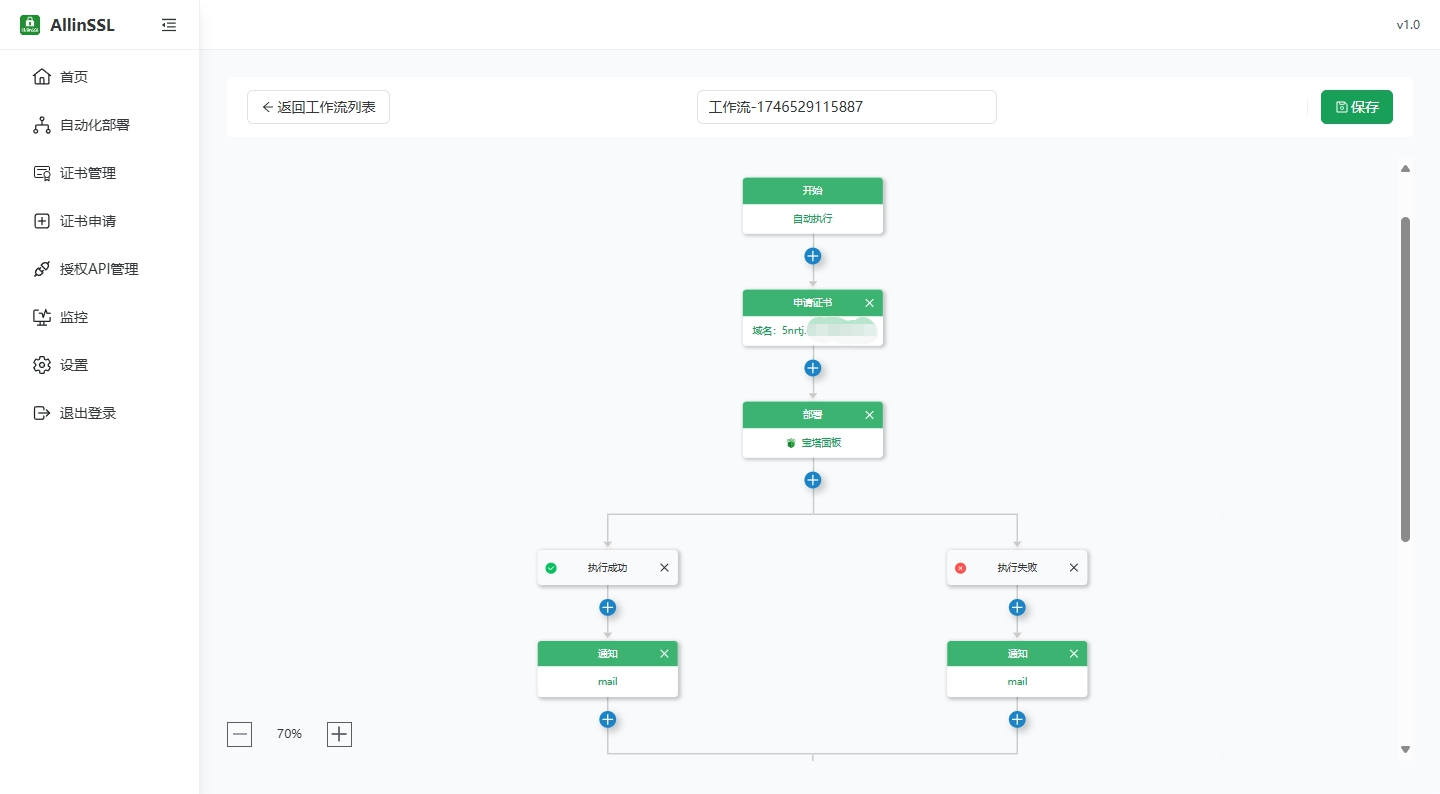
| Feature | Supported Providers |
|---|---|
| DNS Validation | Alibaba Cloud, Tencent Cloud, Cloudflare... |
| Certificate Deploy | BaoTa Panel, 1Panel, Alibaba Cloud CDN, Tencent COS |
| Monitoring / Alerts | Email, Webhook, DingTalk |
graph LR
A[Apply Certificate] --> B{Expiry Monitor}
B -->|30 days left| C[Auto Renew]
C --> D[Deploy to Target]
D --> E[Send Notification]
graph TB
    subgraph "Frontend"
        A[Vue 3 + Naive UI]
        A --> B[Vite Build]
        A --> C[Turbo Monorepo]
    end

    subgraph "Backend"
        D[Gin Web Framework]
        D --> E[RESTful API]
        D --> F[Session Management]
        D --> G[Middleware Layer]
    end

    subgraph "Core Services"
        H[Certificate Apply Service]
        I[Certificate Deploy Service]
        J[Workflow Engine]
        K[Monitor Scheduler]
        L[Notification Service]
    end

    subgraph "Data Storage"
        M[(SQLite Database)]
        N[File Storage]
    end

    subgraph "External Integrations"
        O[ACME Protocol]
        P[Cloud Provider APIs]
        Q[DNS Providers]
        R[CDN / Panel APIs]
    end

    A -.-> D
    D --> J
    J --> H
    J --> I
    J --> K
    J --> L
    H --> M
    I --> M
    K --> M
    L --> M
    H --> O
    I --> P
    H --> Q
    I --> R
# Basic Operations
allinssl 1:  Start service 🚀
allinssl 2:  Stop service ⛔
allinssl 3:  Restart service 🔄
allinssl 4:  Modify secure entry 🔐
allinssl 5:  Modify username 👤
allinssl 6:  Modify password 🔑
allinssl 7:  Modify port 🔧

# Web Service Management
allinssl 8:  Disable web service 🌐➖
allinssl 9:  Enable web service 🌐➕
allinssl 10: Restart web service 🌐🔄

# Background Task Management
allinssl 11: Disable background scheduler 📻⛔
allinssl 12: Enable background scheduler 📻✅
allinssl 13: Restart background scheduler 📻🔄

# System Management
allinssl 14: Disable HTTPS 🔓
allinssl 15: Get panel URL 📋
allinssl 16: Update ALLinSSL to latest version (overwrite install) 🔄⬆️
allinssl 17: Uninstall ALLinSSL 🗑️Contributions are welcome in the following ways:
- Report bugs via Issues
- Submit Pull Requests 💻
- Improve documentation 📖
- Share your use cases ✨
- QQ Group: 768610151 👥
- Email: support@allinssl.com 📧
- Bug Reports: GitHub Issues
Open-source projects and communities in the SSL certificate space:
- Let's Encrypt - Free SSL certificate authority
- lego - Go ACME client powering core certificate issuance
- acme.sh - Pure-shell ACME client
- certimate - Workflow design reference; JD Cloud DNS implementation
- certd - Workflow design reference
- Certbot - EFF's official ACME client
- Caddy - Automatic HTTPS web server
Technology stack & dependencies:
🔧 Backend
- Web Framework: gin-gonic/gin
- Database: modernc.org/sqlite
- ACME Client: go-acme/lego
- Session: gin-contrib/sessions
- HTTP Client: go-resty/resty
- Email: jordan-wright/email
- Captcha: mojocn/base64Captcha
- UUID: google/uuid
- Env Config: joho/godotenv
🎨 Frontend
- Framework: Vue 3
- UI Components: Naive UI
- Build Tool: Vite
- Monorepo: Turbo
- Router: Vue Router
- State Management: Pinia
- Utilities: VueUse
- Charts: ECharts
- Workflow Editor: Vue Flow
- HTTP: Axios
- CSS: TailwindCSS
☁️ Cloud Integrations
- Alibaba Cloud: alibabacloud-go SDK
- Tencent Cloud: tencentcloud-sdk-go
- Huawei Cloud: huaweicloud-sdk-go-v3
- Baidu Cloud: bce-sdk-go
- Volcengine: volcengine-go-sdk
- JD Cloud: jdcloud-sdk-go
- Qiniu: qiniu/go-sdk
- Azure: azure-sdk-for-go
- AWS: aws-sdk-go-v2
- Cloudflare: cloudflare-go
Certificate Authorities:
- Let's Encrypt - Free SSL certificates
- ZeroSSL - Free SSL certificates
- Google Trust Services
- SSL.com
- BuyPass
- TrustAsia
- Racent
Special thanks to all DNS providers and CDN vendors for their open APIs.
Thanks to the following contributors:
This project is licensed under the AGPL-3.0 license.
🌟 Star this project to support development | Recommended for: small-to-medium site operations, multi-certificate management, and automated HTTPS deployment